Ajax SIM is a service featuring a pre-installed roaming SIM card. It’s designed to integrate seamlessly with an Ajax system to ensure comprehensive control over residential and commercial premises.
The SIM cards come pre-installed in Ajax Hubs, configured and ready to use.
Follow the below steps to get your SIM set up, before registering and commissioning your site and Ajax Hub for ARC monitoring.
!
Why Activate Your Ajax SIM?
If your Ajax SIM is not activated within 3 days, it will be automatically deactivated by Ajax. The Hub will not be able to send or receive signals via SIM until it is activated. Please also note that Ajax SIM cards require Malevich OS 2.16 or later to be compatible. Please check your Ajax Malevich OS and update if needed.
1
Add the Hub to the Required Space
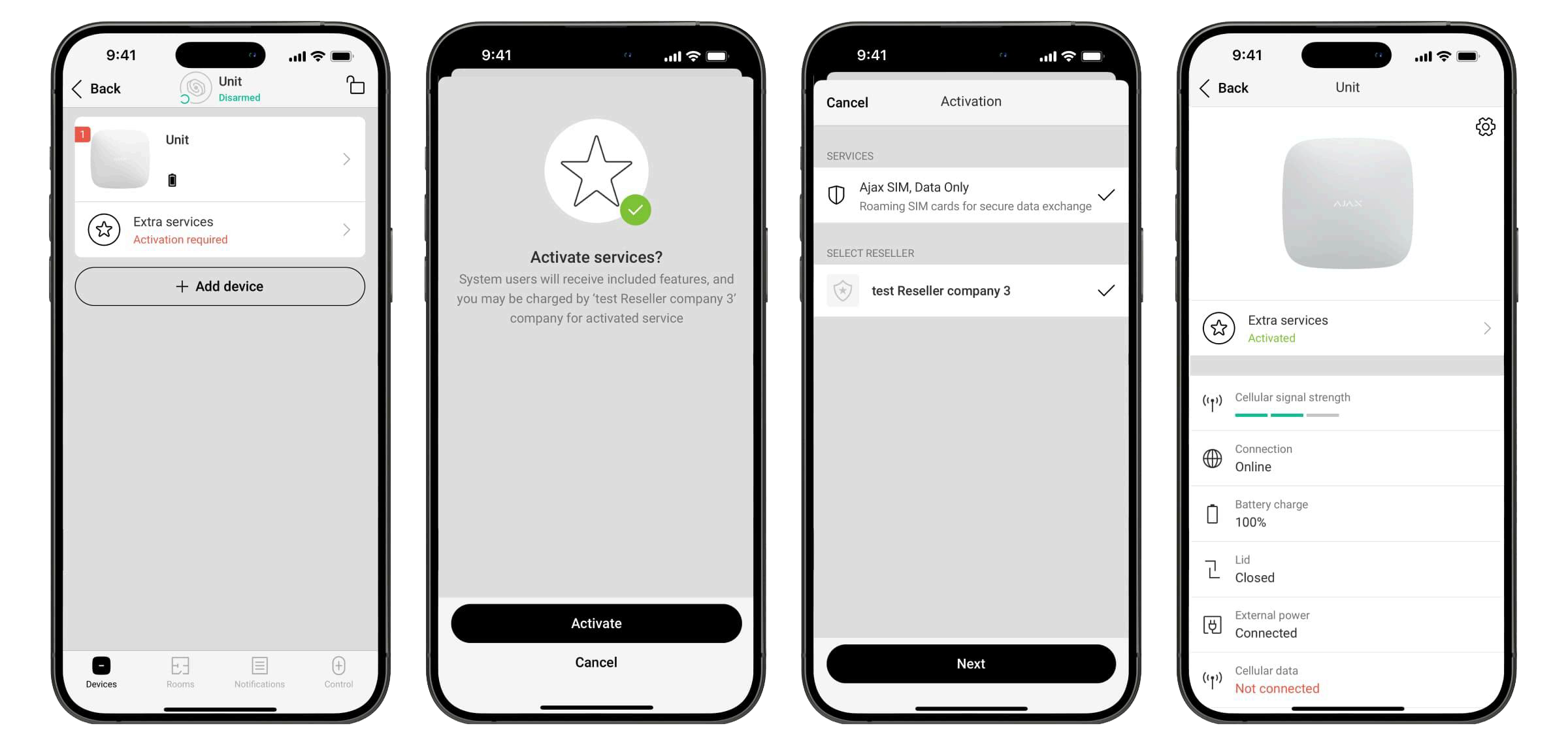
In the Ajax App, you can create a space for your site where all devices can be managed. The Hub that you intend to operate with Ajax SIM should be added to the relevant space.
2
Select Your Hub from Your Devices
Go to the Devices tab in the app. Select the Hub from the list – you should see the message “Activation required“. Please note that activation will initiate the billing process for your Ajax monitoring.
3
Complete the Activation Process
Follow the activation instructions on screen and select PureMonitoring from the list of available distributors. You will also be asked to select a service, but at this time there is only one available for selection.
See full guide below for troubleshooting and additional FAQs